

Most beam design guides tell you what to calculate. This one tells you how to actually do it — in Python, with real numbers, across four beam types, with working code you can drop into your next project. We’ll cover the engineering behind each check, show you what the output means, flag the common errors that fail peer review, and tell you which software to use and when.
A beam, at its core, resists two things: bending (flexure) and shear. Everything else — deflection, cracking, lateral torsional buckling, torsion — is a serviceability or stability check on top of that fundamental load path. Get those two right, verify the serviceability checks, and your beam works. The question is how efficiently and how repeatably.
▼ Collapse
- Beam Types and When to Use Each
- RC Beam Design: Full Python Worked Example (EC2)
- Steel Beam Design: Python + AS 4100 / EC3
- Timber Beam Design: GLT and Solid Timber
- Prestressed Beams: Concepts and Checks
- How to Interpret Results: What Numbers Mean in Practice
- Software Comparison and Python Integration
- Practical Demo: SkyCiv API Beam Analysis in Python
- Common Beam Design Errors and How to Avoid Them
- What to Prefer: Decision Framework
1. Beam Types and When to Use Each
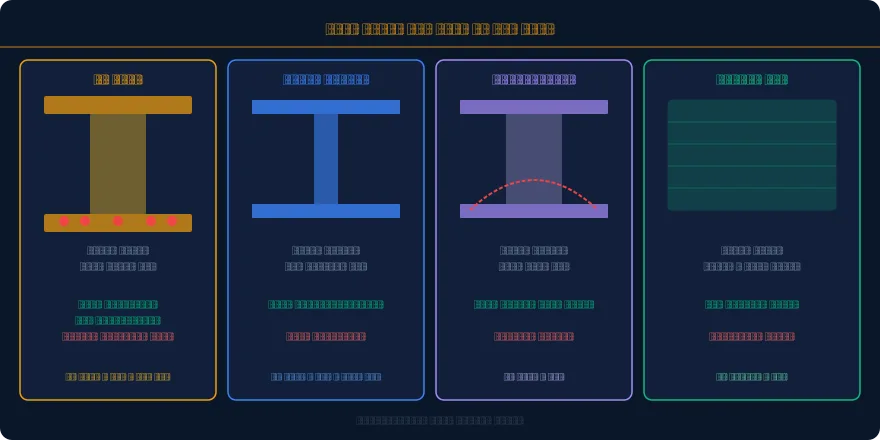
The most expensive beam design mistake is choosing the wrong beam type for the application. Here’s the decision logic engineers actually use:
| Scenario | Preferred Beam | Reason |
|---|---|---|
| Residential floors, spans 4–10m | RC beam or flat plate | Cost, fire resistance, no maintenance |
| Commercial floors, spans 8–18m | Steel UB or composite beam | Speed of erection, span capability, lighter |
| Bridge deck, spans 20–40m | Prestressed concrete | Long spans, slim depth, crack-free service |
| Exposed roof structure, spans 6–16m | Glulam (GLT) | Aesthetic, low carbon, light |
| Industrial portal, spans 15–40m | Steel fabricated plate girder | Span range, haunch efficiency, economy |
| Transfer beam, heavy point loads | RC or steel, deep section | High shear and moment demands, rigidity |
2. RC Beam Design: Full Python Worked Example (EC2)
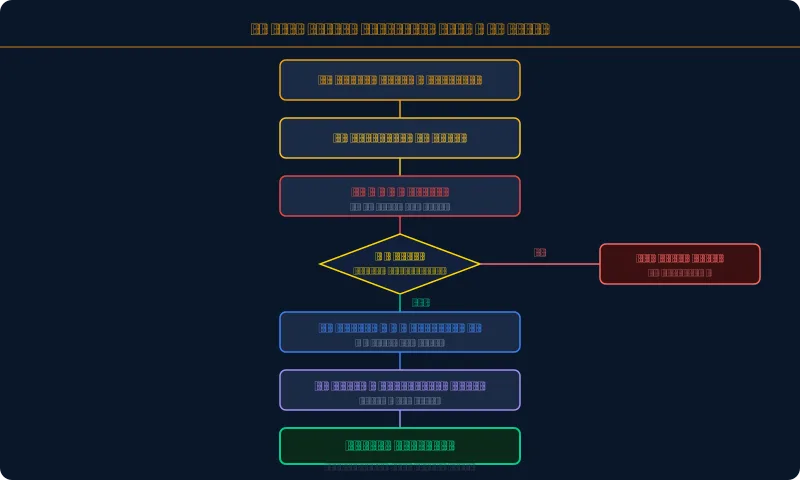
This complete Python script designs a simply supported rectangular RC beam to Eurocode 2 (BS EN 1992-1-1) for bending, shear, and deflection. Every variable is named to match the code notation. Run it in any Python environment (Jupyter, VS Code, or paste into an online IDE like repl.it).
# RC BEAM DESIGN TO EC2 (EN 1992-1-1)
# ============================================================
import math
# — INPUTS —
fck = 30 # Concrete char compressive strength (MPa)
fyk = 500 # Steel yield strength (MPa)
b = 300 # Beam width (mm)
d = 500 # Effective depth (mm) – cover + bar/2 deducted
h = 550 # Overall depth (mm)
L = 7.0 # Span (m)
M_Ed = 180e6 # Design bending moment M* at ULS (N.mm)
V_Ed = 120e3 # Design shear force V* at ULS (N)
# — MATERIAL FACTORS —
gamma_c = 1.5 # Concrete partial factor
gamma_s = 1.15 # Steel partial factor
fcd = fck / gamma_c # Design compressive strength
fyd = fyk / gamma_s # Design steel yield strength
alpha_cc = 0.85 # Long-term effects factor
fcd_eff = alpha_cc * fcd
# — FLEXURAL DESIGN —
K = M_Ed / (b * d**2 * fck) # K-factor (dimensionless bending parameter)
K_bal = 0.167 # EC2 limit for singly reinforced section
print(f“K = {K:.4f} (limit = {K_bal})”)
if K > K_bal:
print(“WARNING: K exceeds Kbal. Compression steel or increase d required.”)
else:
print(“Singly reinforced section OK.”)
# Lever arm z (EC2 Cl 6.2.3)
z = d * (0.5 + math.sqrt(0.25 – K / 1.134)) # mm
z = min(z, 0.95 * d) # EC2 upper limit on z
print(f“z = {z:.1f} mm ({z/d*100:.1f}% of d)”)
# Required tension steel area
As_req = M_Ed / (fyd * z) # mm2
print(f“As,req = {As_req:.0f} mm2”)
# Minimum and maximum steel checks (EC2 Cl 9.2.1.1)
As_min = max(0.26 * (fck**0.5 / fyk) * b * d, 0.0013 * b * d)
As_max = 0.04 * b * h
print(f“As,min = {As_min:.0f} mm2 | As,max = {As_max:.0f} mm2”)
# Bar selection (pick from standard bar table)
bars = {“N12”:113, “N16”:201, “N20”:314, “N25”:491, “N32”:804}
n_bars = 4
bar_size = “N20”
As_prov = n_bars * bars[bar_size]
print(f“Provided: {n_bars} x {bar_size} = {As_prov} mm2”)
print(f“Utilisation (req/prov) = {As_req/As_prov*100:.1f}%”)
2.1 Shear Design (EC2 Variable Strut Inclination Method)
rho_l = As_prov / (b * d) # Longitudinal steel ratio
# Shear resistance without shear reinforcement (VRd,c)
k = min(1 + math.sqrt(200 / d), 2.0) # Size effect factor
CRd_c = 0.18 / gamma_c
v_min = 0.035 * k**1.5 * fck**0.5
VRd_c = max(CRd_c * k * (100 * rho_l * fck)**(1/3), v_min) * b * d # N
print(f“VRd,c = {VRd_c/1000:.1f} kN (no links needed if V_Ed < VRd,c)”)
if V_Ed > VRd_c:
print(“Shear links required.”)
# Variable strut inclination: choose theta = 21.8deg (cot=2.5) for efficiency
cot_theta = 2.5 # EC2 range: 1.0 to 2.5
z_shear = 0.9 * d
# Required Asw/s (link area per unit spacing)
Asw_s = V_Ed / (z_shear * fyd * cot_theta) # mm2/mm
print(f“Asw/s required = {Asw_s:.3f} mm2/mm”)
# Try R10 links @ 200mm spacing (2 legs)
Asw_prov = 2 * 78.5 / 200 # 2 legs x 78.5mm2 / 200mm spacing
print(f“Provided: R10@200 (2 legs) = {Asw_prov:.3f} mm2/mm”)
print(f“Shear link utilisation = {Asw_s/Asw_prov*100:.1f}%”)
2.2 Deflection Check (EC2 Span-to-Depth Ratio)
rho_0 = fck**0.5 * 1e-3 # Reference reinforcement ratio = sqrt(fck)/1000
# Basic L/d ratio for simply supported beam (EC2 Table 7.4N)
if rho_l <= rho_0:
ld_basic = 11 + 1.5 * fck**0.5 * rho_0/rho_l + 3.2 * fck**0.5 * (rho_0/rho_l – 1)**1.5
else:
ld_basic = 11 + 1.5 * fck**0.5 * rho_0/(rho_l) + fck**0.5 / 12 * (0)**0.5
# Modification factor for steel stress (EC2 Eq 7.17)
sigma_s = fyk / gamma_s * (As_req / As_prov) # actual steel stress at SLS
F1 = 500 / (fyk * As_req / As_prov) # EC2 multiplier
ld_limit = ld_basic * F1
ld_actual = L * 1000 / d
print(f“L/d actual = {ld_actual:.1f} | L/d limit = {ld_limit:.1f}”)
if ld_actual <= ld_limit:
print(“Deflection check PASS”)
else:
print(“Deflection FAIL – increase d or As,prov”)
What These Numbers Mean in Practice
- K = 0.167 (Kbal limit): Above this and your section needs compression steel or a deeper beam. Most residential beams run K = 0.06–0.12. If K is above 0.14, consider increasing depth before adding comp. steel.
- z/d ratio: Typically 0.85–0.95 for efficient sections. If z/d approaches 0.95 (the cap), your beam is lightly loaded and depth-efficient. If z/d is near 0.80, the neutral axis is high and bending is dominant.
- As utilisation 80–95%: Ideal range. Below 70% means you’ve overspecified (or can reduce depth). Above 100% means you need more bars or larger diameter.
- VRd,c: If your V_Ed is less than VRd,c, minimum links only. This is often the case for lightly loaded slabs and shallow beams. Don’t over-design shear reinforcement — it’s expensive to fix and often incorrect.
3. Steel Beam Design: Python + AS 4100 / EC3
Steel beam design is simpler in terms of material constitutive behaviour (elastic-perfectly plastic), but the failure modes are more subtle: local flange buckling, web shear buckling, and lateral-torsional buckling (LTB) govern long unrestrained beams. The Python script below covers the complete section capacity and LTB check to AS 4100-2020.
# STEEL BEAM DESIGN TO AS 4100-2020
# ============================================================
import math
# — SECTION PROPERTIES (UB 460x190x74 example) —
# Source: OneSteel / InfraBuild section tables
d = 457 # Overall depth (mm)
bf = 190 # Flange width (mm)
tf = 14.5 # Flange thickness (mm)
tw = 9.0 # Web thickness (mm)
Zx = 1460e3 # Elastic section modulus (mm3)
Sx = 1660e3 # Plastic section modulus (mm3)
Ix = 335e6 # Second moment of area (mm4)
Iy = 16.0e6 # Minor axis (mm4)
J = 645e3 # Torsion constant (mm4)
Iw = 922e9 # Warping constant (mm6)
ry = math.sqrt(Iy / (74*1000/7850)) # Approx radius of gyration (mm)
# — MATERIAL —
fy = 300 # Yield strength (MPa) – Grade 300
fu = 440 # Tensile strength (MPa)
E = 200e3 # Elastic modulus (MPa)
G = 80e3 # Shear modulus (MPa)
phi = 0.9 # Capacity reduction factor (AS 4100 Cl 1.6)
# — SECTION CLASSIFICATION (AS 4100 Cl 5.2) —
lambda_ef = (bf/2/tf) * math.sqrt(fy/250) # Flange slenderness
lambda_ew = (d – 2*tf)/tw * math.sqrt(fy/250) # Web slenderness
print(f“Flange lambda_ef = {lambda_ef:.1f} (compact limit = 9)”)
print(f“Web lambda_ew = {lambda_ew:.1f} (compact limit = 82)”)
# — SECTION MOMENT CAPACITY (AS 4100 Cl 5.1) —
# Compact section: phi*Ms = phi*Sx*fy
phi_Ms = phi * Sx * fy / 1e6 # kN.m
print(f“phi.Ms (section capacity) = {phi_Ms:.1f} kN.m”)
# — LOADS —
M_star = 280 # Design bending moment (kN.m)
V_star = 160 # Design shear force (kN)
L_seg = 4.0 # Unrestrained segment length (m)
# — LATERAL TORSIONAL BUCKLING (AS 4100 Cl 5.6) —
# Reference buckling moment (Mo)
L_e = L_seg * 1000 # mm
Moa = (math.pi/L_e) * math.sqrt(E*Iy * (G*J + (math.pi/L_e)**2 * E*Iw)) / 1e6 # kN.m
print(f“Moa (reference buckling moment) = {Moa:.1f} kN.m”)
# Slenderness reduction factor (AS 4100 Eq 5.6.1.1)
Ms = Sx * fy / 1e6 # nominal section moment capacity kN.m
lambda_s = math.sqrt(Ms / Moa) # member slenderness
alpha_m = 1.0 # moment modification factor (uniform = 1.0)
lambda_ms = math.sqrt(Ms / (alpha_m**2 * Moa))
gamma = (Ms/Moa)**0.5 if Moa > 0 else 0
alpha_s = 0.6 * ( (Ms/Moa)**0.5 + 3 )**0.5 – math.sqrt(Ms/Moa) + 3
alpha_s = 0.6 * (math.sqrt((Ms/Moa) + 3) – math.sqrt(Ms/Moa))
alpha_s = min(alpha_s, 1.0)
phi_Mb = phi * alpha_m * alpha_s * Ms # kN.m
print(f“alpha_s = {alpha_s:.3f} | phi.Mb (member capacity) = {phi_Mb:.1f} kN.m”)
print(f“M* / phi.Mb = {M_star/phi_Mb*100:.1f}% {‘PASS’ if M_star <= phi_Mb else ‘FAIL’}”)
# — SHEAR CAPACITY (AS 4100 Cl 5.11) —
Aw = d * tw # Web area (mm2)
phi_Vv = phi * 0.6 * fy * Aw / 1e3 # kN
print(f“phi.Vv (shear capacity) = {phi_Vv:.1f} kN”)
print(f“V* / phi.Vv = {V_star/phi_Vv*100:.1f}% {‘PASS’ if V_star <= phi_Vv else ‘FAIL’}”)
Interpreting Steel Beam Results
- alpha_s (LTB reduction factor): This is the critical number. alpha_s = 1.0 means no LTB reduction — your beam is fully restrained or short enough. alpha_s < 0.6 means LTB is governing — consider adding intermediate restraints rather than going to a heavier section.
- Moa vs Ms ratio: If Moa >> Ms, the section fails in yielding before buckling — you’re in a stocky beam regime. If Moa << Ms, LTB dominates — add restraints or use a deeper section with wider flanges (better Iy).
- Section classification: lambda_ef > 9 (AS 4100) or 10 (EC3 Class 1) means local flange buckling reduces capacity. Your section becomes non-compact and you must use Ze < Sx. Standard rolled UBs are typically compact at Grade 300.
- Shear utilisation > 80%: Common in transfer beams. If phi_Vv is close to V_star, check web local buckling (AS 4100 Cl 5.11.2) and consider a thicker web plate or welded stiffeners.
4. Timber Beam Design (AS 1720.1)
# TIMBER BEAM DESIGN TO AS 1720.1
# Glulam GL13c (structural glulam, 13 MPa bending)
# ============================================================
# — SECTION AND MATERIAL —
b_t = 90 # Width (mm)
h_t = 360 # Depth (mm)
L_t = 6.0 # Span (m)
f_b = 13 # Characteristic bending strength (MPa) for GL13c
f_s = 1.6 # Characteristic shear strength (MPa)
E_t = 10500 # Mean MOE (MPa)
# — MODIFICATION FACTORS (AS 1720.1 Cl 2.4) —
k1 = 1.0 # Load duration factor (1.0 for live load)
k4 = 1.0 # Partial seasoning factor (dry service)
k6 = 1.0 # Temperature factor (standard)
k9 = 1.0 # Strength sharing factor (single member)
k12 = 0.9 # Stability factor (accounting for LB, conservatively)
phi_t = 0.85 # Capacity factor for bending (Table 2.1)
phi_s = 0.75 # Capacity factor for shear
# — SECTION PROPERTIES —
Z_t = b_t * h_t**2 / 6 # Section modulus (mm3)
A_t = b_t * h_t # Cross-section area (mm2)
# — DESIGN CAPACITY —
M_d = phi_t * k1 * k4 * k6 * k9 * k12 * f_b * Z_t / 1e6 # kN.m
V_d = phi_s * k1 * k4 * k6 * f_s * (2/3) * A_t / 1e3 # kN
print(f“Bending capacity phi.Md = {M_d:.1f} kN.m”)
print(f“Shear capacity phi.Vd = {V_d:.1f} kN”)
# — LOADS AND CHECKS —
w = 12.0 # Design UDL (kN/m)
M_t = w * L_t**2 / 8 # kN.m
V_t = w * L_t / 2 # kN
print(f“M* = {M_t:.1f} kN.m | M*/phi.Md = {M_t/M_d*100:.1f}%”)
print(f“V* = {V_t:.1f} kN | V*/phi.Vd = {V_t/V_d*100:.1f}%”)
# — DEFLECTION (SLS) —
I_t = b_t * h_t**3 / 12 # mm4
w_sls = 8.0 # SLS UDL (kN/m) – typically 0.7*ULS or SLS load combo
delta = 5 * (w_sls/1000) * (L_t*1000)**4 / (384 * E_t * I_t) # mm
delta_lim = L_t * 1000 / 300 # L/300 for floors (AS 1170.1)
print(f“Deflection = {delta:.1f} mm | Limit (L/300) = {delta_lim:.1f} mm”)
print(f“Deflection {‘PASS’ if delta <= delta_lim else ‘FAIL’}”)
5. Prestressed Beams: Key Concepts and Checks
Prestressed beam design is a post-graduate topic in full — but the core concepts and quick checks every engineer should understand are accessible. The fundamental idea: apply a compressive force to the concrete beam (via high-tensile tendons) that pre-offsets the tensile stresses caused by loading. Result: the beam behaves as though it is much stronger in tension than plain concrete allows.
| Check | Formula | Limit | Consequence if Failed |
|---|---|---|---|
| Transfer stress (top fibre) | sigma = -P/A + Pe*yt/I | 0.6 fci at transfer | Crushing at top at transfer |
| Service stress (bottom fibre) | sigma = -P_eff/A – Pe*yb/I + M*yb/I | 0 to 0.45fck (no tension) | Cracking, Class 2 or 3 |
| Ultimate bending (ULS) | Mu vs M* check | Mu >= M* | Structural failure |
| Prestress losses | Elastic shortening + creep + shrinkage + relaxation | Typically 15-25% total | Effective prestress too low |
| Anchorage zone | Bursting force Fbst = 0.25 Pi (1 – sqrt(a/b)) | Tie bars in zone | Splitting at anchor |
When to use prestressed vs RC: Rule of thumb — spans above 12m start making prestressed attractive for slabs and above 18m for beams. Below these thresholds, the construction complexity and specialist contractor requirement rarely pay back against deeper RC sections. For highway bridges specifically, see our Seismic Design of Highway Bridges guide.
6. Software Comparison and Python Integration

Python API access is now the critical differentiator. Here is what you can automate per tool for beam design specifically:
| What to Automate | Tool | Time Saved per Project |
|---|---|---|
| 50 span variations in one script | ETABS COM API or Robot REST | 4-8 hours |
| Auto-export beam results to Excel | ETABS API and openpyxl | 1-2 hours |
| PDF calculation sheets automatically | Python handcalcs and pdfkit | 2-4 hours |
| Check 200 beam sections against tables | Pure Python with pandas | 3-5 hours |
7. Practical Demo: SkyCiv API Beam Analysis in Python
SkyCiv offers the most accessible beam API for Python. Fully documented REST interface returning structured JSON. Here is a working script pattern:
# Full docs: https://skyciv.com/api/v3/
import requests
API_KEY = “your_api_key”
payload = {
“auth”: {“username”: “your_email”, “key”: API_KEY},
“functions”: [
{“function”: “S3D.session.start”, “arguments”: {}},
{“function”: “S3D.model.set”, “arguments”: {
“model”: {
“nodes”: {“1”:{“x”:0,“y”:0,“z”:0}, “2”:{“x”:7,“y”:0,“z”:0}},
“members”: {“1”:{“start”:1,“end”:2,“section_id”:1}},
“sections”: {“1”:{“name”:“RC300x500”,“material_id”:1,“rect”:{“width”:300,“height”:500}}},
“supports”: {“1”:{“node”:1,“restraint_code”:“FFFFRR”},“2”:{“node”:2,“restraint_code”:“RFFFRR”}},
“distributed_loads”: {“1”:{“member”:1,“x_mag_A”:-20,“x_mag_B”:-20,“type”:“UDL_GLOBAL_Y”}}
}}},
{“function”: “S3D.analyze”, “arguments”: {}},
{“function”: “S3D.results.members.get”, “arguments”: {}}
]
}
response = requests.post(“https://api.skyciv.com/v3/functions/run”, json=payload)
data = response.json()
# Extract results and feed into your EC2 design script
print(data[“response”][-1]) # moment and shear arrays
Full docs at skyciv.com/api/v3. The free tier is enough for design checks on standard projects. Combine this API call with the EC2 script from Section 2 to go from span and load inputs to a complete checked design in under 2 minutes of automated execution.
8. Common Beam Design Errors and How to Avoid Them
⚠ Errors That Fail Peer Review
| Error | Why Wrong | Fix |
|---|---|---|
| Using h instead of d for flexure | Overestimates lever arm, underestimates As | d = h – cover – stirrup – bar/2 |
| Not checking As,min | Brittle failure with no ductility | Always verify As,prov >= As,min |
| Skipping LTB for steel beams | phi_Mb can be 40-60% below phi_Ms | Check alpha_s for every unrestrained segment |
| Using ULS loads for deflection | Deflection is SLS – no load factors | Use SLS characteristic load combo only |
| Forgetting k1 in timber design | k1=0.57 for permanent loads halves capacity | Apply k1 per governing load duration |
| Not capping z at 0.95d (EC2) | Underestimates As for shallow beams | z = min(calculated z, 0.95d) |
9. What to Prefer: Honest Decision Framework
| Situation | Recommended Tool | Reason |
|---|---|---|
| Learning beam design fundamentals | Pure Python in Jupyter | Forces you to understand every step |
| Production RC beam on a project | ETABS and Excel or PDF output | Code-compliant, peer-reviewable |
| Quick steel check, small firm | SkyCiv or Python script | Fast, cheap, API-ready for automation |
| Batch checking 200 beam sizes | Python with pandas | Nothing else scales this way |
| Complex frame with many beams | ETABS or RFEM with Python API | Global analysis with member design integrated |
| Documenting calcs for submission | Tedds or Python handcalcs | Professional sheets direct from code |
| Timber or GLT beams | Python or RFEM timber module | Most RC tools handle timber poorly |
The Python-first bottom line: Build your own beam library in Python. Start with the RC script in Section 2, add steel and timber functions. Version-control it. Every new project becomes a 5-minute parametric check. The initial 2-3 days of setup pays back within a month on any active practice. For seismic load combinations that govern beam design in many regions see our Seismic Design guide. For BIM and automation context see AI in Structural Engineering.
References
- EN 1992-1-1:2004 (Eurocode 2) Design of Concrete Structures
- AS 3600-2018 Concrete Structures Standard (Standards Australia)
- AS 4100-2020 Steel Structures Standard (Standards Australia)
- AS 1720.1-2010 Timber Structures (Standards Australia)
- AISC 360-22 Specification for Structural Steel Buildings
- SkyCiv API v3 Documentation
- CSI ETABS API Reference
- Flexural Analysis and Design of Beams civilmat.com
- AI in Structural Engineering civilmat.com
- Structural Health Monitoring Guide civilmat.com
