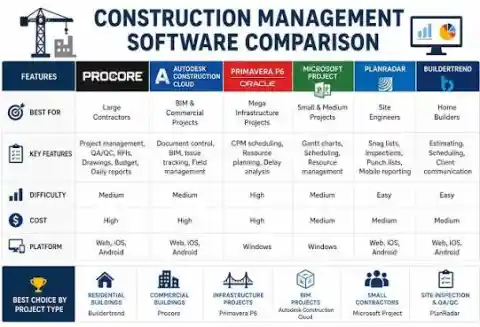
The best civil engineering project management software for infrastructure projects in the US, UK, and Canada is Oracle Primavera P6 for critical-path scheduling combined with Procore or Autodesk Construction Cloud for field management, RFIs, and cost control. No single platform does both well — this two-tool reality is the most important thing to understand before spending a dollar on software. McKinsey's 2017 research found large civil projects typically run 20% longer than scheduled and up to 80% over budget; the right software stack directly attacks both numbers by replacing disconnected spreadsheets and email chains with structured, auditable workflows.
Most software reviews treat this as a checklist of features. The actual decision is simpler and harder: where does your project bleed? If you're constantly fighting schedule drift on a 500-activity infrastructure program, you need Primavera P6's resource-leveled CPM engine. If your team drowns in RFI backlog, submittal delays, drawing revisions, and change orders, you need Procore or Autodesk Construction Cloud. Engineers on r/civilengineering will tell you the same thing: "Procore doesn't replace P6" appears in nearly every software thread on that sub. Both tools assume you know which problem you're solving first.
This guide covers every major platform — Procore, Autodesk Construction Cloud, Oracle Primavera P6, Microsoft Project, Fieldwire, Buildertrend, and Oracle Aconex — with real pricing tiers, a side-by-side feature matrix, CPM formulas you'll use on site, a 90-second interactive software selector, and a downloadable resource table. If you're a structural or civil engineer advising your firm on software investment, start with the selector tool in Section 6.
📋 Table of Contents
- Why Civil Projects Need Dedicated PM Software
- The Two-Tool Reality: Scheduling vs Management Platforms
- Top Software: Technical Deep Dives
- Master Feature Comparison Table
- Pricing Breakdown
- Interactive Software Selector Tool
- CPM Scheduling Fundamentals & Formulas
- BIM Integration: Why It Changes Everything
- What Engineers Actually Say (Reddit Field Notes)
- Free & Open-Source Alternatives
- Downloadable Resources & Templates
- Step-by-Step Software Selection Guide
- Common Selection Mistakes
- Frequently Asked Questions
Why Civil Projects Need Dedicated PM Software
A highway interchange involves 600+ interdependent activities, 40+ subcontractors, hundreds of daily RFIs and submittals, material delivery constraints tied to lane closures, and a public agency owner who needs weekly schedule updates in a specific format. Managing that in Excel isn't theoretical — teams do it. The cost shows up as two or three full-time admin staff doing nothing but data transcription, RFI logs maintained in three different formats by three different parties, and a schedule that's always two weeks out of date.
Dedicated civil engineering project management software addresses three distinct failure modes: schedule transparency (what's actually critical, and is the baseline realistic?), document control (where is the approved drawing, who approved the last RFI?), and cost early warning (is the change order log going to blow the contingency before 60% completion?). Spreadsheets and generic PM tools handle none of these adequately at infrastructure scale.
The Two-Tool Reality: Scheduling vs Management Platforms
The civil/infrastructure software market has a structural split that vendors don't advertise clearly. Scheduling engines do one thing: they model time and resources. Critical path method (CPM), resource leveling, baseline comparisons, and what-if analysis require dedicated algorithms that construction management platforms haven't replicated. Primavera P6 has spent 30+ years becoming very good at this specific problem. Procore and Autodesk Construction Cloud have spent their R&D budget on field mobility, document workflows, and BIM integration — not CPM engines.
The integration between the two tool types works well enough in practice. Procore and Autodesk Construction Cloud both offer P6 schedule import/export, so updates pushed from P6 appear in the management platform's Gantt view for stakeholder communication. This sync isn't perfect — activity-level cost loading in P6 doesn't always reconcile cleanly with Procore's cost module — but it's workable on most projects.
Top Civil Engineering PM Software: Technical Deep Dives
Procore — Field/Document/Cost Hub
Best for: General contractors, large commercial/infrastructure projects, high RFI/submittal volume
Procore dominates the construction management platform category for a specific operational reason: its pricing model. Unlike every other major platform that charges per seat, Procore prices by annual construction volume — the dollar value of projects your firm runs through the platform. That means 50 subcontractors and 20 owners' reps can all access your project at no extra cost. On a large project with 30+ parties needing system access, this is financially significant.
The RFI and submittal modules are Procore's strongest assets. Response tracking, routing rules, configurable approval chains, and automatic deadline monitoring are genuinely better-engineered here than in competing platforms. Drawing management — versioning, markup, who-approved-what audit trail — handles the sort of volume that kills SharePoint-based approaches. The cost module (budgets, change events, change orders, invoicing, subcontractor pay applications) is comprehensive enough that most mid-size GCs replace their ERP for project financials entirely.
The scheduling module is Procore's weakest point. It renders Gantt charts. It does not do CPM in any meaningful way — no float calculation, no resource leveling, no critical path analysis. Any project needing a real schedule runs P6 or Microsoft Project alongside Procore, importing the schedule as a Gantt view for stakeholder communication.
Pricing is quote-only, based on annual construction volume. Published estimates suggest entry-level access starts in the several-hundred-dollars-per-month range for small volume, scaling into five to six figures annually for large-volume users. Negotiate on multi-year contracts. procore.com | G2 Reviews
Autodesk Construction Cloud (ACC) — BIM-First Platform
Best for: Design-build firms, BIM-heavy structural/MEP coordination, Autodesk-ecosystem users
Autodesk Construction Cloud emerged from the merger of BIM 360 and PlanGrid in 2020–2021. The clearest advantage over Procore is native BIM integration. If your design workflow runs through Revit, Navisworks, or Civil 3D, ACC's model coordination tools — clash detection, model comparison, shared coordinate systems — work without the friction of third-party connectors. Procore does BIM, but it's implemented as an integration layer, not a native capability.
Autodesk Build — the main construction management module — covers RFIs, submittals, daily logs, observations, and cost management competitively with Procore. Pricing is per-user subscription, historically around $60–$120 per user per month depending on module, making it easier to budget than Procore's volume-based model. The weakness is the same as Procore's: ACC is not a CPM scheduling engine. For infrastructure projects requiring P6 schedule submissions, you run P6 externally and connect via APIs or XER import. construction.autodesk.com
Oracle Primavera P6 — CPM Scheduling Standard
Best for: Infrastructure, DOT/government, oil & gas, defense, any project requiring formal CPM schedule submission
Primavera P6 is the reference implementation for critical path method scheduling on large projects. It's been the government and infrastructure standard for three decades. Practically speaking: if you win a DOT highway contract, a water treatment plant, or any public infrastructure program, you deliver P6 schedules in XER or XML format. End of discussion.
What P6 does that Microsoft Project cannot: resource leveling across thousands of activities (P6 handles 100,000+ activities per file), true multi-project resource pools across a program, Earned Value Management to ANSI/PMI standards, fragnet analysis for delay claims, and schedule quality checks (logic gaps, out-of-sequence progress, missing relationships) that are standard requirements on government projects.
P6 comes in two forms. P6 Professional is a Windows desktop application — perpetual license, historically ~$2,500–$2,900/seat plus ~22% annual maintenance. Runs fast, works offline, is the choice for schedulers doing heavy daily work. P6 EPPM is Oracle's cloud/web version with multi-user portfolio management — quote-only, typically an enterprise agreement. The EPPM interface is noticeably slower for schedulers used to the desktop client. Training: Plan Academy is the best-regarded independent P6 training resource. oracle.com/primavera
Microsoft Project — Accessible Scheduling
Best for: Small–medium projects, firms without P6 requirements, Microsoft 365 environments
Microsoft Project has the most transparent pricing in this category. Cloud: Plan 1 ~$10/user/month, Plan 3 ~$30/user/month, Plan 5 ~$55/user/month. On-premise: Standard ~$680 one-time, Professional ~$1,130 one-time. That price gap versus P6 is real, and for projects under ~200 activities with straightforward resource requirements, Project is often adequate.
Trade-offs versus P6 for infrastructure work: resource leveling is less powerful, schedule quality checking is minimal, it doesn't generate P6-format XER files for government submissions, and EVM capabilities are limited. For a 150-activity bridge project not requiring a government schedule format, Project is perfectly adequate and saves substantially on licensing. The Microsoft 365 integration — Teams, SharePoint, Power BI — is a genuine ecosystem advantage that P6 doesn't offer.
Fieldwire — Field-Crew Favorite
Best for: Small–medium contractors, punch lists, plan viewing on mobile, field task management
Fieldwire (acquired by Hilti in 2021) is the most practical entry-level tool for field engineers. The free tier supports up to 5 users and unlimited projects. Paid tiers — historically Pro ~$39, Business ~$59, Business Plus ~$79/user/month (annual) — are dramatically cheaper than Procore or ACC while covering the core field workflow: task creation, plan viewing/markup on mobile, punch lists, and form-based daily reports.
What Fieldwire can't do: no CPM scheduling, no serious cost management, no formal RFI/submittal tracking with approval chains. For small firms running simple projects, it's the best value in the market. Firms running projects requiring formal document control will outgrow it. The field adoption rate on Fieldwire is noticeably higher than on enterprise platforms — foremen actually open it. fieldwire.com
Buildertrend — Residential/Remodel Specialist
Best for: Home builders, remodelers, small residential contractors
Buildertrend is built specifically for residential construction — not civil/infrastructure projects. Tiered pricing historically: Essential ~$199/mo, Advanced ~$499/mo, Complete ~$799/mo. The platform covers client communication, project scheduling, budgeting, change orders, and daily logs in one tool. Civil engineers evaluating software for highway or bridge work should skip this category. Structural engineers who also advise on residential projects should know it exists. buildertrend.com
Oracle Aconex — Mega-Project Document Control
Best for: Rail networks, airports, energy programs, government capital programs at billion-dollar scale
Oracle Aconex is an enterprise document management and collaboration platform used on some of the world's largest infrastructure programs — think Crossrail, not a local bridge replacement. Pricing is quote-only, typically structured as project-based or enterprise agreements. The audit trail and multi-party collaboration capabilities at mega-project scale justify the cost for programs where document volume is measured in millions, not thousands. For most civil engineering firms, Procore or ACC is the right level. oracle.com/aconex
Master Feature Comparison Table
| Feature | Procore | Autodesk ACC | Primavera P6 | MS Project | Fieldwire |
|---|---|---|---|---|---|
| True CPM / Critical Path | ✗ No | ✗ No | ✓ Best-in-class | ~ Limited | ✗ No |
| Resource Leveling | ✗ No | ✗ No | ✓ Full (100K+ acts) | ~ Basic | ✗ No |
| Earned Value (EVM) | ~ Partial | ~ Partial | ✓ ANSI Standard | ~ Basic | ✗ No |
| BIM Integration | ~ Good (3rd party) | ✓ Best (native) | ✗ Minimal | ✗ No | ✗ No |
| RFI / Submittal Mgmt | ✓ Excellent | ✓ Strong | ✗ Not designed | ✗ No | ✗ No |
| Drawing Management | ✓ Excellent | ✓ Strong | ✗ No | ✗ No | ✓ Good (mobile) |
| Cost / Change Orders | ✓ Excellent | ✓ Good | ~ Schedule cost only | ~ Basic | ✗ No |
| Mobile Field Apps | ✓ Strong | ✓ Strong | ✗ Weak | ~ Limited | ✓ Mobile-first |
| Offline Mode | ~ Limited | ~ Limited | ✓ Desktop (P6 Pro) | ✓ Desktop | ✓ Yes |
| DOT/Gov Schedule Format (XER) | ✗ No | ✗ No | ✓ Native XER/XML | ✗ No | ✗ No |
| Schedule Quality Check | ✗ No | ✗ No | ✓ Full audit | ✗ No | ✗ No |
| Subcontractor Portal | ✓ Unlimited users | ✓ Per user cost | ✗ No | ~ Limited | ~ Basic |
| ERP/Accounting Integration | ✓ Large marketplace | ✓ Good | ~ P6 API | ✓ Microsoft 365 | ✗ Limited |
| Pricing Model | Volume-based | Per user/month | Perpetual / EPPM | Per user/month | Per user/month |
Pricing Breakdown
| Platform | Model | Approx. Cost | Free Option | Best Fit |
|---|---|---|---|---|
| Procore | Annual construction volume | Quote-only | No | Large GC / infrastructure |
| Autodesk ACC Build | Per user / year | ~$60–120/user/mo | 30-day trial | BIM / design-build |
| Primavera P6 Professional | Perpetual desktop | ~$2500–2900/seat + maint | No | Infrastructure scheduling |
| Primavera P6 EPPM | Cloud enterprise | Quote-only | No | Program management |
| MS Project Plan 1 (cloud) | Per user / month | ~$10/user/mo | No | Simple scheduling |
| MS Project Plan 3 (cloud) | Per user / month | ~$30/user/mo | No | Resource management |
| MS Project Standard (desktop) | Perpetual | ~$680 one-time | No | Offline scheduling |
| MS Project Professional (desktop) | Perpetual | ~$1130 one-time | No | Full desktop PM |
| Fieldwire Basic | Free tier | Free up to 5 users | Yes (5 users) | Small teams |
| Fieldwire Pro | Per user / month | ~$39/user/mo | No | Field coordination |
| Fieldwire Business | Per user / month | ~$59/user/mo | No | Mid-size field teams |
| Buildertrend Essential | Monthly flat | ~$199/month | No | Home builders |
| Oracle Aconex | Enterprise / project | Quote-only | No | Mega-projects |
Interactive Software Selector Tool
Answer four quick questions and get a specific software stack recommendation for your firm type and project profile:
🔧 Civil Engineering PM Software Selector
Requirements (check all that apply):
CPM Scheduling Fundamentals for Civil Engineers
Critical Path Method (CPM) is the scheduling backbone of every serious civil engineering project. Understanding the math behind what Primavera P6 calculates automatically is essential for interpreting schedules, spotting schedule manipulation, and defending or rebutting delay claims in front of a disputes board or court.
Core CPM Formulas
BIM Integration: Why It Changes Everything
4D BIM — linking 3D model elements to schedule activities — is where the gap between scheduling engines and management platforms becomes most visible. Connecting a Revit structural model to a P6 schedule lets you animate construction sequence, identify clash-driven schedule impacts before work starts, and give owners a visual simulation that flat Gantt charts can't provide. It also lets you track physical progress by model element — which structural bays are complete, which are in progress — rather than estimating percentage-complete by gut.
Autodesk Construction Cloud handles this most naturally because the Revit model lives natively in the Autodesk Platform Services cloud. Model coordination tools identify clashes between structural, MEP, and architectural elements before they become field RFIs — reducing one of the most expensive categories of schedule-impacting rework. Each RFI resolved by model coordination before construction starts avoids an average of 3–7 days of field delay on complex projects.
Civil 3D corridor models for highway and earthworks projects integrate differently than vertical building models. The key link is between Civil 3D quantities (earthworks volumes, pavement areas, material quantities) and your cost/schedule tool. Autodesk's InfraWorks and Quantity Takeoff have connectors into ACC. For more on BIM workflows in structural and civil engineering, explore the BIM & AI category.
What Engineers Actually Say (Reddit Field Notes)
The most unfiltered views on construction software come from r/civilengineering, r/construction, and r/projectmanagement — where people write without a sales agenda. Themes that repeat across hundreds of upvoted comments:
Aggregated themes from r/civilengineering and r/construction threads on PM software — not direct quotes, but representative of recurring sentiment across high-upvote comments:
On Primavera P6: "Frustrating to learn, but once you know it, it's genuinely the right tool for large schedules. The real problem is management asks for P6 schedules without anyone trained to actually read them."
↑ Common theme: P6 knowledge gap between schedulers and project managers is widespread
On Procore vs ACC: "If you're design-build with an Autodesk-heavy design team, ACC makes more sense. If you're a GC whose subs are already on Procore, switching creates friction in both directions."
↑ Network effect matters — what your subcontractors and owners already use influences the selection significantly
On Fieldwire: "Our foremen actually open it. That's more than I can say for every enterprise platform we've tried. Simplicity on a construction site matters more than features."
↑ Field adoption rate is the #1 predictor of ROI — a platform foremen ignore generates zero useful data
On implementation failure: "Management bought Procore. Nobody trained us on it. We still use email for RFIs. The software didn't fail — the implementation did."
↑ Implementation failure (not software failure) is the most common reason platforms are abandoned after 6 months
Free & Open-Source Alternatives
Small firms, students, and engineers on tight budgets have viable free options — with clear limitations. None provide construction-specific RFI/submittal/BIM workflows. They're general PM tools doing double duty as construction scheduling aids:
| Tool | Type | Best For | Limitations | Website |
|---|---|---|---|---|
| ProjectLibre | Open-source desktop | CPM scheduling (P6 alternative) | No cloud sync; no BIM; no construction workflows | projectlibre.com |
| GanttProject | Free desktop | Simple Gantt + task dependencies | Basic; no resource leveling; no construction modules | ganttproject.biz |
| OpenProject | Open-source / self-hosted | Gantt + tasks + documents + time tracking | No BIM or construction-specific RFI workflows | openproject.org |
| Freedcamp | Freemium web | Task tracking + collaboration | Not construction-specific; no scheduling engine | freedcamp.com |
| Odoo Community | Open-source ERP | Project + accounting + CRM in one system | Complex setup; no construction modules by default | odoo.com |
| Fieldwire Basic | Freemium SaaS | Field task management + plan viewing | 5-user limit; no cost/RFI/submittal tracking | fieldwire.com |
Downloadable Resources, Templates & Training Materials
Free and legitimate training resources, templates, and research reports for civil engineering PM software — from official vendor, academic, and professional association sources:
| Resource | Type | Source | Access |
|---|---|---|---|
| P6 Schedule Template Library (Infrastructure) | XER / XML template | Oracle Construction & Engineering | oracle.com/primavera |
| Procore Construction Resource Library | PDF / Excel templates | Procore | procore.com/library |
| McKinsey "Reinventing Construction" (2017) | Research report (PDF) | McKinsey Global Institute | mckinsey.com |
| AACE RP 29R-03 — CPM Scheduling | Recommended Practice PDF | AACE International | aacei.org |
| Construction Schedule Template (Excel) | Excel workbook (.xlsx) | Vertex42 | vertex42.com |
| Plan Academy — Free P6 Beginner Lessons | Online course (free intro) | Plan Academy | planacademy.com |
| Autodesk University — ACC Learning Paths | Online tutorials / labs | Autodesk University | autodesk.com/au |
| PMI PMBOK Guide — Schedule Management (Ch. 6) | Reference standard | Project Management Institute | pmi.org |
| ENR Construction Technology Outlook | Annual report | Engineering News-Record | enr.com/technology |
| Construction Dive — Software Coverage | Industry news / analysis | Construction Dive | constructiondive.com |
| G2 — Construction PM Software Reviews | User review database | G2.com | g2.com |
| ASCE Construction Engineering Resources | Technical standards | ASCE | asce.org |
- 1Diagnose your core pain point firstBefore looking at any product, write down the top 3 things that fail on your current projects: schedule drift, RFI backlog, drawing version chaos, cost overruns, or field reporting gaps. Software selection only works if you know which problem you're actually solving. A team that needs CPM scheduling and buys Procore has wasted their budget.
- 2List non-negotiable technical requirementsIdentify mandatory capabilities before demos: Do government contracts require P6 XER schedule format? Does your design team run Revit or Civil 3D (BIM integration requirement)? Do you need ERP integration (Sage, Viewpoint, QuickBooks)? These requirements narrow the field from seven platforms to two or three without touching a demo.
- 3Shortlist 2–3 platforms and request structured demosContact Procore, Autodesk, and Oracle for demos — or use G2, Capterra, and SoftwareAdvice filtered to "construction" and "civil engineering" reviews. Request a demo that walks through your specific workflows (your type of RFI, your change order process) — not a generic product tour.
- 4Run a 30-day pilot with actual field staffThis is where most evaluations fail. Run the pilot with field engineers and foremen, not just office PM staff. If field crews won't open the app daily on their phones, the platform generates no project data and delivers zero ROI regardless of feature count.
- 5Test every integration before signingManually test the data flow between your chosen platform and your existing CAD/BIM software, accounting system, and ERP before signing an annual contract. Integration failures discovered after contract signing are the most expensive mistakes in this category — and they're common.
- 6Negotiate the contract on multi-year termsProcore and Oracle contracts have pricing discretion. Multi-year commitments, volume guarantees, and explicit mention of competitive evaluation (naming Autodesk as the alternative) are all legitimate negotiating leverage. Never sign the first quote on any enterprise platform in this space.
Common Selection Mistakes Civil Engineers Make
These failure modes appear repeatedly in KPMG and Deloitte construction industry surveys, as well as in Reddit post-mortems from engineers who've been through failed implementations:
- Buying on feature lists, not on workflow fit. A platform with 200 features you don't use is less valuable than one with 20 features your entire team opens daily. Procore's submittal module is excellent — but only if you actually run formal submittals.
- Underestimating training cost. Primavera P6 takes 2–4 weeks of structured training to reach scheduler productivity. Add that to year-one cost — license cost alone is misleading for total cost of ownership.
- Assuming one tool replaces two. This is the two-tool reality failure mode: firms buy Procore expecting it to replace P6. It doesn't. The two tools serve fundamentally different functions.
- Missing government schedule format requirements. A DOT contract requiring P6 XER format means you need P6, regardless of what your preferred management platform is. Confirm contract specifications before selecting scheduling software.
- Ignoring the subcontractor access model. Procore's unlimited-user model is valuable specifically when 30–50 subcontractors need occasional system access. Per-seat pricing for that many occasional users is expensive with platforms that don't offer volume pricing.
- Piloting with office staff only. Implementation consistently fails when field crews don't adopt the platform. A tool that office PMs love but foremen ignore generates no real project data — and no ROI.
- Signing annual contracts before integration testing. Confirm actual data flows between your new platform and your accounting software, CAD tools, and ERP before committing. This is where post-implementation regret most commonly originates.
Structural Engineering Consulting — Remote & International Projects
M. Haseeb Mohal is a graduate structural engineer providing technical consulting services: structural analysis, design review, and engineering advisory for civil and infrastructure projects. Available for remote collaboration on international projects.
Frequently Asked Questions
Related Articles
- BIM & AI in Civil Engineering — Category Hub
- Structural Design Technical Guides
- Excel Sheets for Civil & Structural Engineers
- Automation & Scripting for Engineers
- FEA Software for Structural Analysis
Be the first to comment.